Reading the execution log
Executions, in your bot's menu, lists every message your bot received in the last 7 days, one row per message. Open a message to see which flow answered it, why the others didn't, and what each step did.
The list
The line at the top counts the last 24 hours: how many messages came in, how many failed (and the flow that failed most), and how many matched no flow. Show filters the list to just those.
Each row is one message:
- when it arrived, who sent it and what they sent;
- the flows that ran for it, numbered by their place in your list. Green ran fine, red failed. A message that went through a flow with Continue on shows both flows;
- how long it took. Messages to your test bot carry a Test label.
New messages appear on their own. If you've scrolled down or opened a message, they wait behind a new messages button instead of moving the list under you.
Search and filters
Search by message text, sender name, chat ID, user ID or execution ID. Then narrow by bot (Production or Test), by flow, by status (Answered, Failed, Matched no flow, Running), by how the flow started (a command, a message, a button tap, or a reply to a question) and by time (the last hour, 24 hours or 7 days). Filters are part of the page's link, so you can share a filtered view or go back to the previous one.
One message
Open a message to see what was sent, when, to which bot, from which release, and how long it took. Below it is who sent it, with their earlier messages.
When something failed
A red box at the top explains it in one place:
- which step failed, in which flow;
- what went wrong, in plain words: what OpenAI, Telegram or the website you called said;
- whether the person got a reply, and a hint about the usual fix.
Open node in builder takes you straight to that step. If the same flow failed on other messages in the last 24 hours, a link lists them.
Steps that talk to other services, like Generate Text, Send Message and
HTTP Request, have an Error output. Wire it to a
Send Message so people hear back when the step fails. If nothing is wired to it, the
message counts as failed, because the person got no answer.
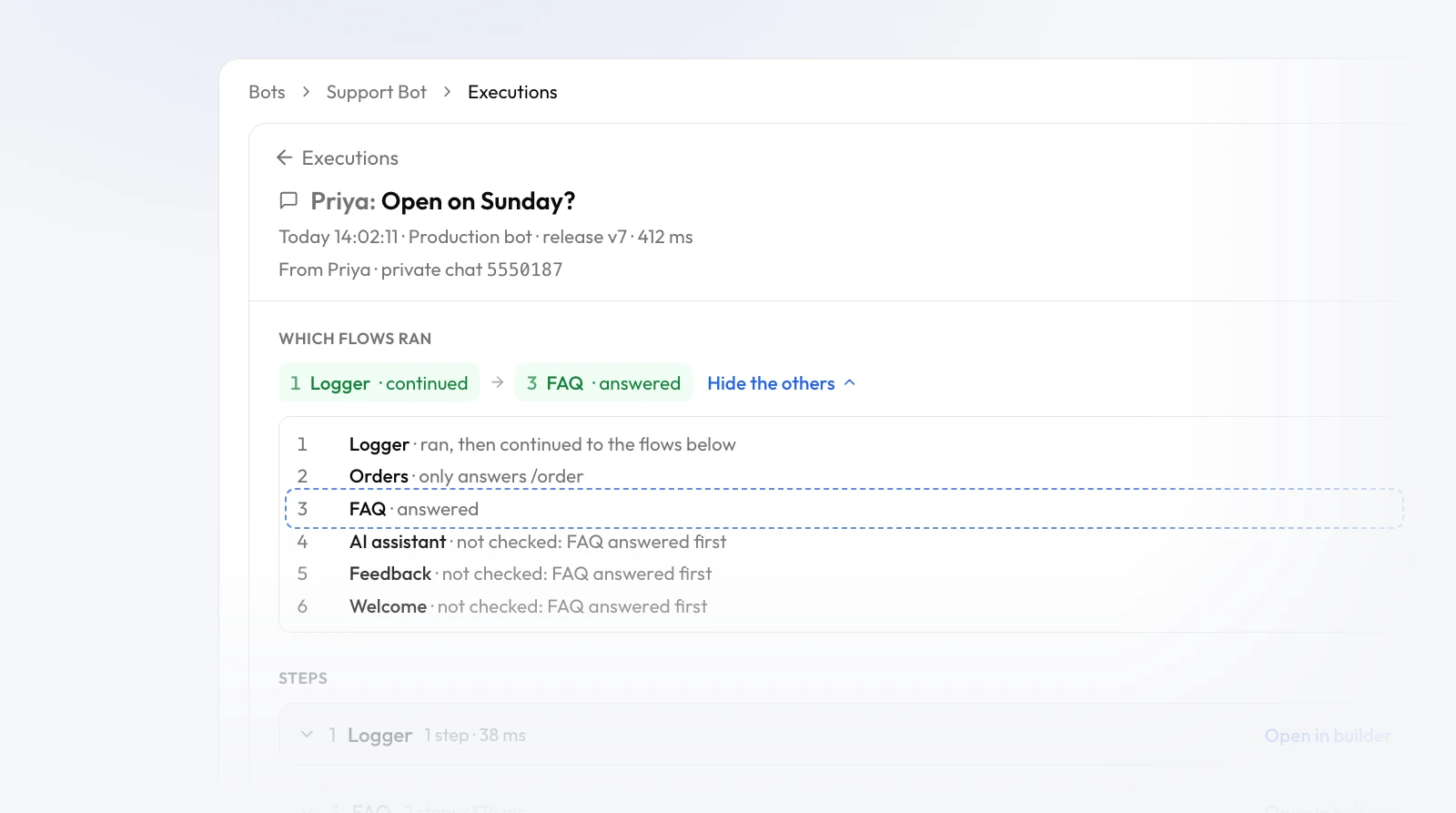
Which flows ran, and why not the others
Which flows ran lists the flows that ran for the message, in order. Why not the others? goes through the rest of your list, one line each: what the flow answers instead (like only answers /order), that it ignores commands, or that it wasn't checked because a flow above it answered first. That's usually all you need to spot a flow in the wrong place. See which flow answers a message.
A button tap, or a reply to a wait-for-input question, goes straight back to the flow that asked, so those show from its button or from its question instead.
Steps
Each flow's steps are listed with how long they took. A step shows the values it used, with every
{{variable}} filled in, and a message the bot sent appears the way the person saw
it. Steps after a failure are greyed out as Didn't run.
Replay and Test all
While Test all is on, click any row in the Test messages panel to open that message here.
The other way round, Replay in Test all in a message's ⋯ menu sends it again through your current drafts. Test all has to be running. The reply goes to whoever last messaged your test bot in that session, never to the person who sent the original. Messages can be replayed, button taps can't.
The same menu has Copy link, Copy details for support and the raw message Telegram sent.
Limits
Executions keeps 7 days. Your plan's monthly limit counts flow runs: a message that goes through two flows uses two. Once it's used up, messages still appear here, marked The monthly flow run limit was reached, and no flow runs until the 1st of the next month.
Next
Something not answering at all? Try Troubleshooting. For how the list of flows is checked, see How flows work.