How flows work
A bot is a list of flows. When a message arrives, Gramflow checks the list from the top, and the first flow that matches answers it. You test the whole list together, then deploy it as one release you can roll back.
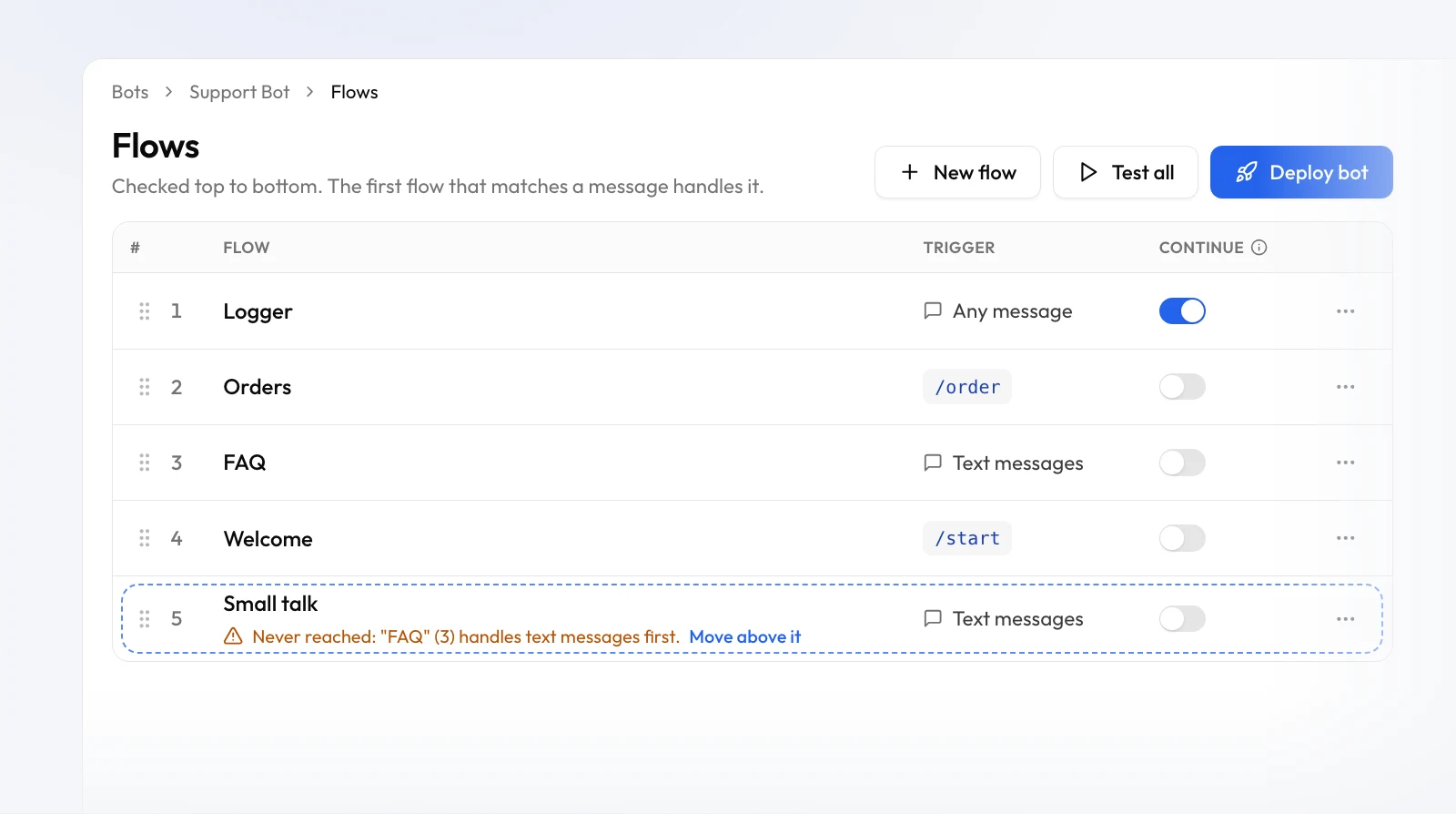
Which flow answers a message
Your bot's Flows page lists every flow in order. For each message, Gramflow goes down the list and asks each flow's trigger whether it matches:
-
A
Command Receivedtrigger matches its own command, like/order 42for/order. -
A
Message Receivedtrigger matches the kind of message it's set to: any message, text only, or photos only.
The first flow that matches handles the message, and the flows below it are skipped. So one message gets one answer, from the flow you put highest. Drag a flow by its handle to change the order, or use Move up / Move down in its ⋯ menu.
Commands and message flows
A /command is also a text message, so a flow that answers "any text" could swallow
your commands. To stop that, Message Received has Ignore commands,
on by default: a message flow lets /commands pass by, and your command flows answer
them wherever they sit in the list. Turn it off only when you want one flow to catch everything,
commands included.
Continue: let more than one flow run
Sometimes you want a flow to run and let the next one answer. A flow that logs every message is the classic case. Switch on Continue for that flow: after it finishes, Gramflow keeps checking the flows below it. Flows with Continue on run one after another, in list order. Continue does nothing on the last flow, since nothing sits below it.
Buttons and replies go straight back
When a flow sends buttons, or waits for the user's reply with a wait-for-input
step, the tap or the reply goes straight back to that flow. The order of the list doesn't matter
here. Sending a /command instead of replying ends the wait, and the command is
matched like any other message.
Checks: errors and warnings
Gramflow checks your flows as you edit, on the Flows page and in the builder. There are two kinds of problem:
- Errors (red) stop a flow from working: a missing trigger, a required field left empty, a secret that doesn't exist. A flow with errors can't be run, is left out of Test all, and blocks Deploy until it's fixed.
-
Warnings (amber) point at something that probably isn't what you meant, but
they never block you:
- Never reached: a flow higher up already handles every message this one would. Move it above that flow, or narrow the one above.
- Duplicate: two flows answer exactly the same command or message.
- Not connected: a node isn't wired to the trigger, so it never runs.
Each problem comes with a fix next to it: Fix in builder opens the flow with the problem listed, and Move above it reorders the list for you. In the builder, the Checks button in the header lists everything, and Show node takes you to the node that needs attention.
Testing: Run and Test all
Every bot has a test bot next to the real one. Nothing you test ever reaches your real users. There are two ways to test:
- Run, in the builder, tests one flow with one message. Press Run, message your test bot in Telegram, and watch each node light up as it runs, with its inputs and outputs. Run to here on a node stops the run at that node.
- Test all, on the Flows page, tests every flow together, in order, for as many messages as you like. Each message shows up in the Test messages panel with the flow that handled it, and each row counts what it handled. Change the order or fix a flow, then send the message again. Press Stop test when you're done; it also stops on its own after 30 minutes without a message.
Both use your drafts, the flows as they are right now, not what's live. They share the test bot, so only one can run at a time: while Test all is on, Run waits for it to stop.
Deploy, history and roll back
Editing a flow never changes your live bot. The status line at the top of the Flows page tells you what's live and what isn't yet, like Not live yet: 1 new · order changed. When you're ready, press Deploy bot. It walks you through three steps:
- Production bot: connect your real bot's token, if you haven't yet.
- Checks: fix any errors first. Warnings are listed so you can decide.
- Go live: see exactly what changes (new, edited, moved and removed flows), add an optional note, and deploy.
Each deploy saves a release: every flow, their order and their Continue settings, together. History lists your releases. Roll back puts an older release live straight away, and your drafts stay as they are. Take bot offline stops your bot answering until you deploy again; flows and releases are kept.
Next
New here? Getting started walks the whole path from a bot token to a live bot. For what each node does, see the node reference.